Envibe: How to configure Join Fee Discount for Membership Promotion
Question
How can I configure a membership discount on the joining fee for a membership promotion?
Answer
This is a discount on the joining fee (if applicable) for a
membership on sign up. Joining Fee
discount applies to Interactions, the customer web portal and In-house
paperless.
Steps to configure a Joining Fee discount:
1. Configure the Discount to be applied.
2. Configure the Promotion Period
1. Configure the Discount
DATA MANAGEMENT > DISCOUNTS
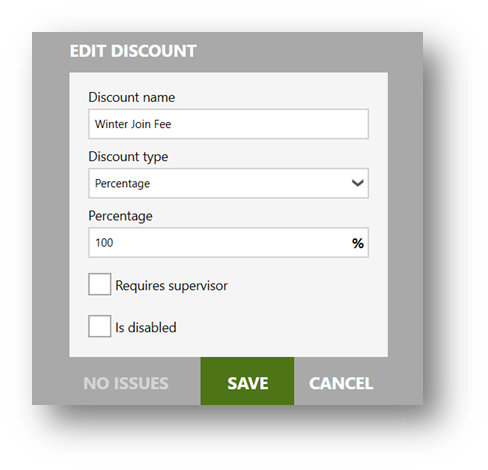
1. Enter New to add a new discount
2. Enter the Discount Name
3. Select the Discount Type
4. Enter the Percentage or Amount for the discount. Note the example there is a 100% discount on joining fee.
2. Configure the Promotional Period
Enter the details for
the duration of the promotional period whereby the discount will apply.
DATA MANAGEMENT > PROMOTION PERIOD
1. Click New to add a Membership Promotion
2. Enter the Name of the promotion
3. Enter the From and Until date range that the promotion will run.
4. Select the applicable Join Fee Discount for the promotion
5. Enter the applicable Membership Categories and/or Membership Types, the promotion can be applied to.
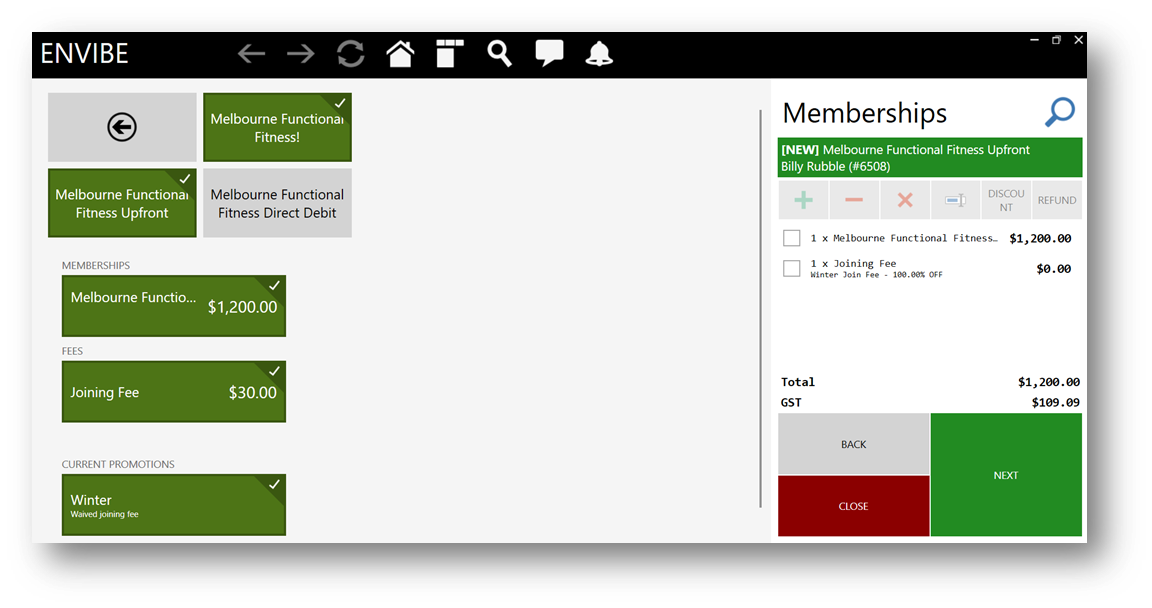
Example in Interactions of discounted joining fee
Related Articles
Envibe: How do I set up a free trial Direct Debit Membership promotion
Question How do I configure my direct debit memberships to off a free period on joining - 4 weeks for example. Answer This is a period at the start of the membership until the first Direct Debit is charged. Applicable to Direct Debit Memberships ...Envibe: How to configure Membership Discount Codes
Question How can I configure a membership promo code. Answer Promo codes can be configured to discount the purchase of an upfront membership on the customer web portal. Steps to Configure a Discount (Promo Code): 1. Configure the Discount 2. ...Envibe: How to configure an Upfront Membership
Question How can I configure an upfront membership? Answer Upfront memberships are subscriptions that are paid in full at the commencement of a membership. There are three components are required to configure an upfront membership: 1. Upfront ...Envibe: How to update a debit fee
Question What is the process to update a debit fee as the charges are increasing? Answer The Update Debit Fee functionality is used to update all membership and enrolment related Debit Fees to a new price. The naming convention ‘Debit Fee’ is about ...Envibe: How to configure Discounts
Question How do I configure discounts for sales made through POS? Answer A Discount in Envibe will allow users to apply standard discounts to sales made through POS. Common Discounts include, Staff Discounts, Concession Discount and other promotional ...