Envibe: How do I set up a free trial Direct Debit Membership promotion
Question
How do I configure my direct debit memberships to off a free period on joining - 4 weeks for example.
Answer
This is a period at the start of the membership until the first Direct Debit is charged. Applicable to Direct Debit Memberships only.
The Direct Debit Waiver applies to memberships sold through
Interactions, Customer Web Portal and In-house Paperless.
The steps to configure a Free Trial/Direct Debit Waiver include:
1. Configure the Promotion Period (Optional)
2. Configure the Membership Type until the first Direct Debit charge
1. Configure the Promotional Period
DATA MANAGEMENT > PROMTION PERIOD
Enter the details for
the duration of the promotional period
1. Click New to add a Membership Promotion.
2. Enter the Name of the promotion.
3. Enter the From and Until date range that the promotion will run.
4. Select any applicable Join Fee Discount that is also available during the promotion.
5. Enter the applicable Membership Categories and/or Membership Types, the promotion can be applied to.
2. Configure the Membership Type until the first Direct Debit Charge
Enter the details of
the duration of the promotional period whereby the discount will apply
DATA MANAGEMENT > MEMBERSHIP TYPE
1. Edit the Membership Type for the Direct Debit Membership
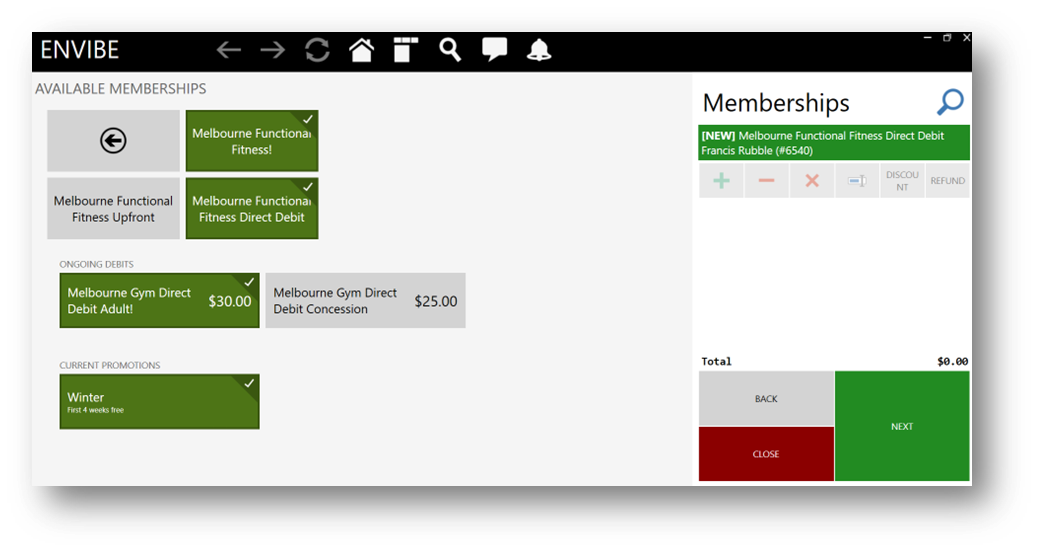
2. Enter the period in Promotion Period for which the direct debit charge is to be waived. For example, if the first 4 weeks of the membership were free, Promotion Period will show 4.
Example in Interactions - 4 weeks until the first Direct Debit Charge
Example on Customer Web Portal - 4 weeks until the first Direct Debit Charge
Related Articles
Envibe: How to add a credit to a Direct Debit membership
Question How do I add a credit to a Direct Debit membership to resolve a membership dispute. Answer To credit a Direct Debit Membership you can: 1. Apply manual credit 2. Apply Bulk Credit Apply Manual Credit Supervisors and senior staff with the ...Envibe: How to configure Join Fee Discount for Membership Promotion
Question How can I configure a membership discount on the joining fee for a membership promotion? Answer This is a discount on the joining fee (if applicable) for a membership on sign up. Joining Fee discount applies to Interactions, the customer web ...Envibe: Direct Debit Management
Debit Management Module Overview The Debit Management module houses all the direct debit administration tasks required to run your organisation. These include things such as: Payment Issue reporting Direct Debit Settlement reports Credit Card Expiry ...Envibe: Are debit runs manual or automatic?
Question How are debit runs processed? Are they a manual or automatic process? Answer When introducing the Envibe debit process and EziDebit integration, it is recommended that the first debit runs are completed manually by an Envibe user to ensure ...Envibe: How to add a Membership Suspension
Question How do I apply a membership suspension? Answer All membership related actions are completed in the Interactions module, allowing users to pick up existing memberships and make adjustments/actions. Suspensions on debit plans are assumptive. ...