Envibe: How do I register previously withdrawn teams
Question
How do I register previously withdrawn teams?
Answer
If a team that has previously withdrawn would like to re-register for an active or upcoming round, the following workflow would apply.
To re-register a withdrawn team, follow these steps:
- Launch TEAMS
- Click FUNCTIONS
- Click MANAGE LEAGUES
- Select the applicable league
- Click SCHEDULE
- Click on the PENDING tab
- Select the withdrawn team, then click REGISTER
- Click SAVE
- Click SAVE to update the fixturing
Once successfully re-registered, the team can be viewed from the REGISTERED tile
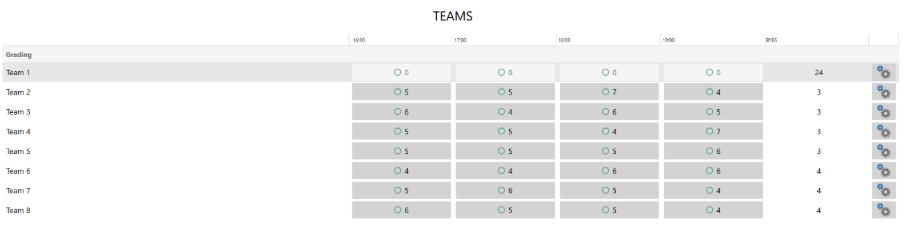
All updated rounds where a re-registered team has filled a Bye will be displayed in the Team Season Fixture.
Related Articles
Envibe: How do I collect registration fees via POS
Question How do I collect registration fees via POS? Answer If an active team had a fee allocated during the registration process, the fee will be raised and available to to take payment via the POS Module. To collect a raised registration fee, ...Envibe: What Teams Module related reports are there
Question What Teams Module related reports are there? Answer Teams related reports are found in Business Reports as well as the Teams module itself. The available reports are: Sales Charges: The Sales Charges report is found in the Business Reports ...Envibe: How can I grade teams within the teams module
Question How can I grade teams within the teams module? Answer Once all grading rounds have been completed and results entered, Teams can be graded before proceeding to fixture your Regular rounds. To grade teams, follow these steps: Launch the TEAMS ...Envibe: How do I edit an existing fixture within the Teams Module
Question How do I edit an existing fixture within the Teams Module? Answer If a round needs to be edited post fixture generation, this can be done within League Management. The time and location can be changed, along with the Home Team and Away Team. ...Envibe: How can I add registration fees retrospectively within the Teams Module
Question How can I add registration fees retrospectively within the Teams Module? Answer In the event that a team was registered without allocating a registration fee, a fee can be raised retrospectively on the account. To raise a fee ...