Envibe: What Teams Module related reports are there
Question
What Teams Module related reports are there?
Answer
Teams related reports are found in Business Reports as well as the Teams module itself.
The available reports are:
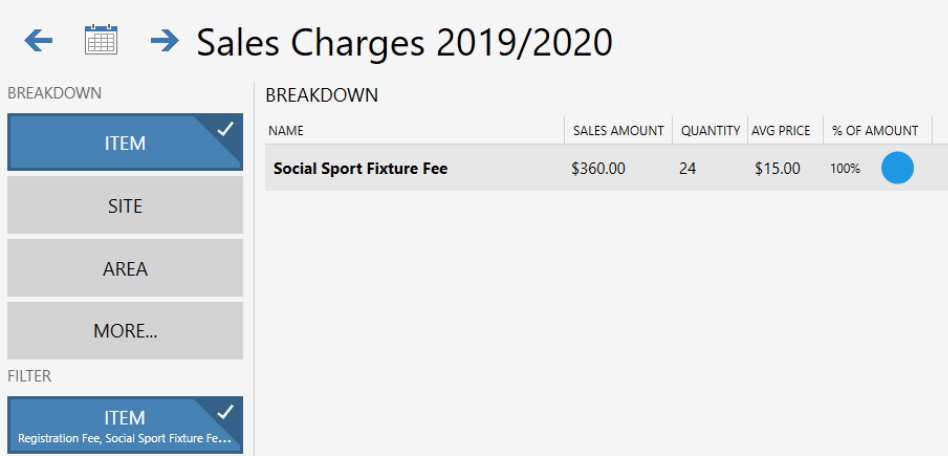
Sales Charges: The Sales Charges report is found in the Business Reports module, this report can be filtered by Teams specific items (such as registration or fixture fees).
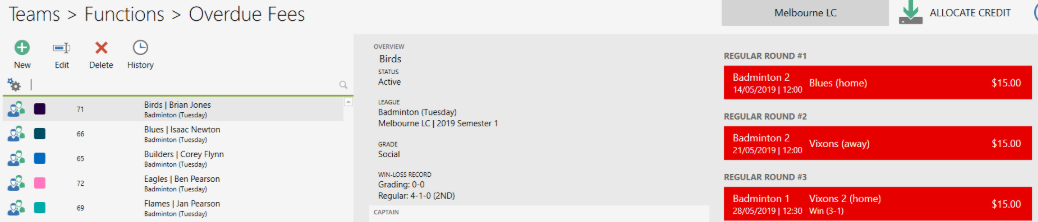
Overdue Fees: A dynamic report showing all overdue fees can be found in the FUNCTIONS menu within the Teams module. A dynamic report showing all teams that may have paid for a round that was since cancelled can be found in the FUNCTIONS menu within the Teams module.
League Print Sheets: There are five print sheets that are available within Teams. To access these -
- Launch the TEAMS module.
- Click FUNCTIONS.
- Click MANAGE LEAGUES.
- Select the applicable league.
- Click PRINT.
The available print outs are:
- Player Lists
- Round Results
- Seasons Fixtures
- Season Ladders
Related Articles
Envibe: How do I edit an existing fixture within the Teams Module
Question How do I edit an existing fixture within the Teams Module? Answer If a round needs to be edited post fixture generation, this can be done within League Management. The time and location can be changed, along with the Home Team and Away Team. ...Envibe: How can I grade teams within the teams module
Question How can I grade teams within the teams module? Answer Once all grading rounds have been completed and results entered, Teams can be graded before proceeding to fixture your Regular rounds. To grade teams, follow these steps: Launch the TEAMS ...Envibe: How do I credit an already paid fee within the Teams Module
Question How do I credit an already paid fee within the Teams Module? Answer To issue a credit, follow these steps: Launch POS Click FUNCTIONS Click MANAGE TEAM Select the team to credit Click OK Select the paid fee then click CREDIT Click FINALISE ...Envibe: How can I refund already paid fees in the Teams Module
Question How can I refund already paid fees in the Teams Module? Answer To issue a refund, follow these steps: Launch POS Click FUNCTIONS Click MANAGE TEAM Select the team to refund Click OK Select the paid fee then click REFUND Select the applicable ...Envibe: How do I register previously withdrawn teams
Question How do I register previously withdrawn teams? Answer If a team that has previously withdrawn would like to re-register for an active or upcoming round, the following workflow would apply. To re-register a withdrawn team, follow these steps: ...