PULSE: Changing Default bankAccounts
Question
We would like to change our default bank Account
Answer
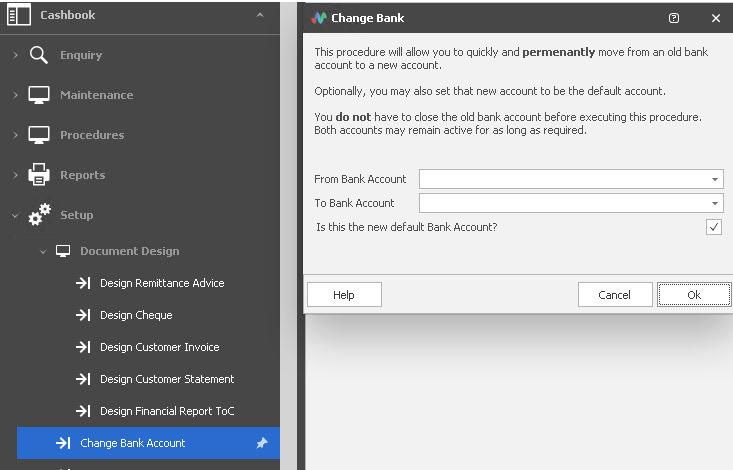
Cashbook> Setup > Change Bank Account
.
1. How does it affect the Creditor Payments?
A: When you run the above process - if you select as Default, it will ensure that when you do a payments run, it will come out of the new bank account. So you don't manually have to go in and change the bank account on every posted invoice.
2. Does it change the Creditor Invoice Form?
A: Yes. It uses a database field which picks up your default bank Acc and states that on the invoice
Related Articles
PULSE Long Service Leave Calculation
This document describes the calculation of Long Service Leave (LSL) in the Pulse Payroll System All efforts have been made to ensure the accuracy of this document, and whilst due care is taken to ensure that the information contained in this document ...Pulse - STP reports
It is important that the employment history details on an employee’s record are correct to ensure the accurate submission of dates to the ATO. Importantly, never change the record type from Terminated to Commenced but, rather create a new ...Pulse: Pulse Protected Earnings (PEA)
Question How is the Protected Earnings Amount entered in the system Answer Search through Pulse's Inbuilt help on Protected Earnings or PEA The amount is hardcoded by the developer on the 1st Jan each year. This amount is updated automatically in the ...Ozedi(Pulse) Quick Start Guide & other information for Payday Super
The attached guides assist Pulse Payroll sites to set up their clients in Ozedi to start using their Superannuation Service for PaydaySuper. Details as below: Ozedi Registration link: ...Pulse - PAYROLL - How to enter a new pay rate
1. First step is calculating what the base rate will be. For example,…. If the salary is to be $50,000 per year. Then to calculate it is $50,000/52 (weeks per year) = $961.53 per week $961.53/38 (hours per week) = $25.3034 per hour 2. If you are ...