Envibe: How do I test trigger recipes
Question
How do I test trigger recipes?
Answer
It is recommended that when
configuring trigger recipes, the Is disabled box is ticked to ensure
triggers do not send prior to testing. Testing triggers ensure accuracy of the
conditions, template and content. When testing Triggers, the user must first
emulate a scenario that meets the trigger conditions of the specific recipe.
Example 1: To test a Happy Birthday trigger with the below conditions, the user would need to ensure there is a contact in the database that has a birthday today. The user would then test the trigger and expect to see the contact surface in the test.
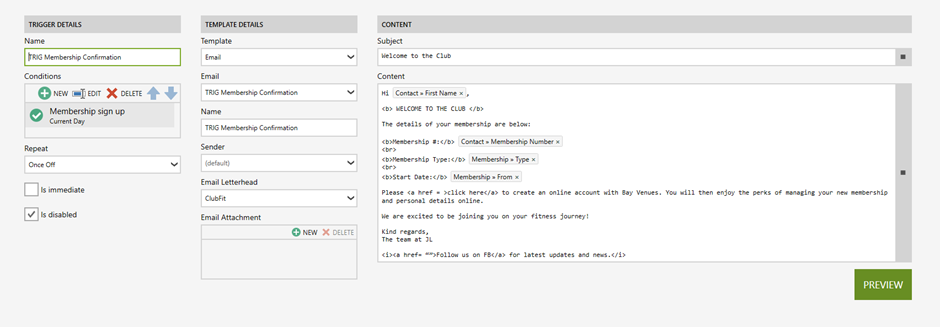
Example 2: To test a Membership Confirmation trigger with the below conditions, the user would need to register a contact for a membership on the current day. Once the registration is complete, the user would test the trigger and expect to see the new member surface in the test.
Example 3: To test a Pass Top Up
Reminder trigger with the below conditions, the user would need to sell a pass
to a contact and change the visit count to be less than two remaining. The user
would then test the trigger and expect to see the new contact surface in the
test.
Once the scenario has been emulated
to meet the trigger criteria, follow the below steps to perform a test trigger run:
- Launch TRIGGERS.
- Click RECIPES.
- Select the relevant recipe.
- Click the Test icon.
Note: The Run Type will default to Trial Run. - Click PERFORM RUN – Here you should see the applicable contact that you are testing surface.
- Select a recipient to review. An Overview will surface to the right of the screen that includes the Trigger name and Recipient name, the date and time it was created, status, recipient contact details, subject and content are displayed.
Related Articles
Envibe: How do I know if a trigger test is successful or unsuccessful
Question How do I know if a trigger test is successful or unsuccessful? Answer Successful Trigger Test a. The recipe conditions are correct as it is filtering the contact database appropriately to only send to the applicable contacts that meet the ...Envibe: What are some example configurations of trigger recipes
Question What are some example configurations of trigger recipes? Answer Happy Birthday Bookings: Booking Confirmation Bookings: Booking Reminder Pass due to expire Pass top up reminder Membership Confirmation Membership Cancellation Membership Debit ...Envibe: What is the trigger report
Question What is the trigger report? Answer The Trigger Report contains a history log of all Triggers sent (both email and SMS). In the report each trigger record will have a succeeded or failed symbol which indicates whether the trigger was ...Envibe: How do I view the history of SMS and email sent via the trigger module
Question How do I view the history of SMS and email sent via the trigger module? Answer A history of all Trigger SMS (including replies) sent to a customer are logged directly against the Contact profile. To view contact SMS history: Launch CONTACTS ...Envibe: How do I enable and disable trigger recipes
Question How do I enable and disable trigger recipes? Answer It is recommended that, when configuring your recipes, the Is disabled box is ticked to ensure triggers do not send prior to testing. Disabled triggers will have the below icon in the ...