Envibe: What is the email unsubscribed report
Question
What is the email unsubscribed report?
Answer
The Email
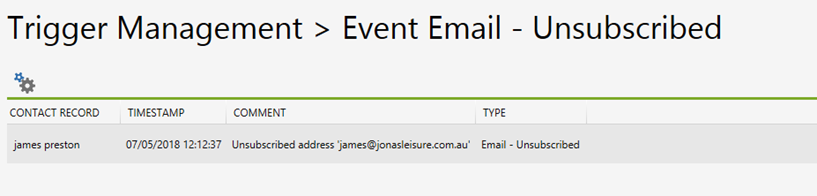
Unsubscribed Report documents all recipients who have unsubscribed from email
correspondence. The report can be filtered by ticking the ‘Has Active Course
Enrolment’ check box and filtered by date when including ‘From’ and ‘Until’
dates.
Note: Opt-out policies within email content are configured externally within a sites Sendgrid account and will be appended to the bottom of the email message automatically.
Related Articles
Envibe: What is the email report
Question What is the email report? Answer The Email Report is a history of all email correspondence. Each email record will have a green tick which indicates it has been successfully sent. The records also include customer specific information ...Envibe: What is the failed email report
Question What is the failed email report? Answer Failed emails can be retried, via a button in Data Management > Emails This option appears when one or more unsent and ignored emails are selected, allowing you to add that email back into the queue to ...Envibe: What is the email rejected report
Question What is the email rejected report? Answer The Email Rejected Report documents all emails that have been rejected and bounced back. The report can be filtered by ticking the ‘Has Active Course Enrolment’ check box and filtered by date when ...Envibe: What is the trigger report
Question What is the trigger report? Answer The Trigger Report contains a history log of all Triggers sent (both email and SMS). In the report each trigger record will have a succeeded or failed symbol which indicates whether the trigger was ...Envibe: What is the SMS report
Question What is the SMS report? Answer The SMS Report hosts a record log of all SMS correspondence. In the report each SMS record will have either a green tick or red cross icon which indicates whether the SMS was successful or failed to send. Each ...